FLOWSTER 5.6 Sneak Preview: New Studio Portal, AI-assisted Error Analysis and NIS2-ready Audit Trail
Self-service meets enterprise governance.
With version 5.6, FLOWSTER bridges maximum usability for business users and uncompromising governance for IT administrators. A completely redesigned Studio Portal, predictive maintenance with integrated AI assessment and a seamless audit trail set new standards for enterprise automation.
First up: new form designer and AI assistant in FLOWSTER Studio
Form designer
The designer automatically generates a start form from the workflow arguments. Fields can be arranged via drag & drop, bound to data sources such as SQL, Active Directory or PowerShell, and maintained in German and English.
The preview shows the form exactly as users will see it – for desktop, tablet and mobile, without starting the workflow.
AI assistant in FLOWSTER Studio
Describe the desired process in your own words or upload a document. The AI assistant first creates a plan that you review and adjust – nothing is built until you approve it, with error handling if desired.
1. The new FLOWSTER Studio Portal – self-service reimagined
Business departments and users get a modern, clear control center that makes routine processes transparent and accessible without an IT ticket.
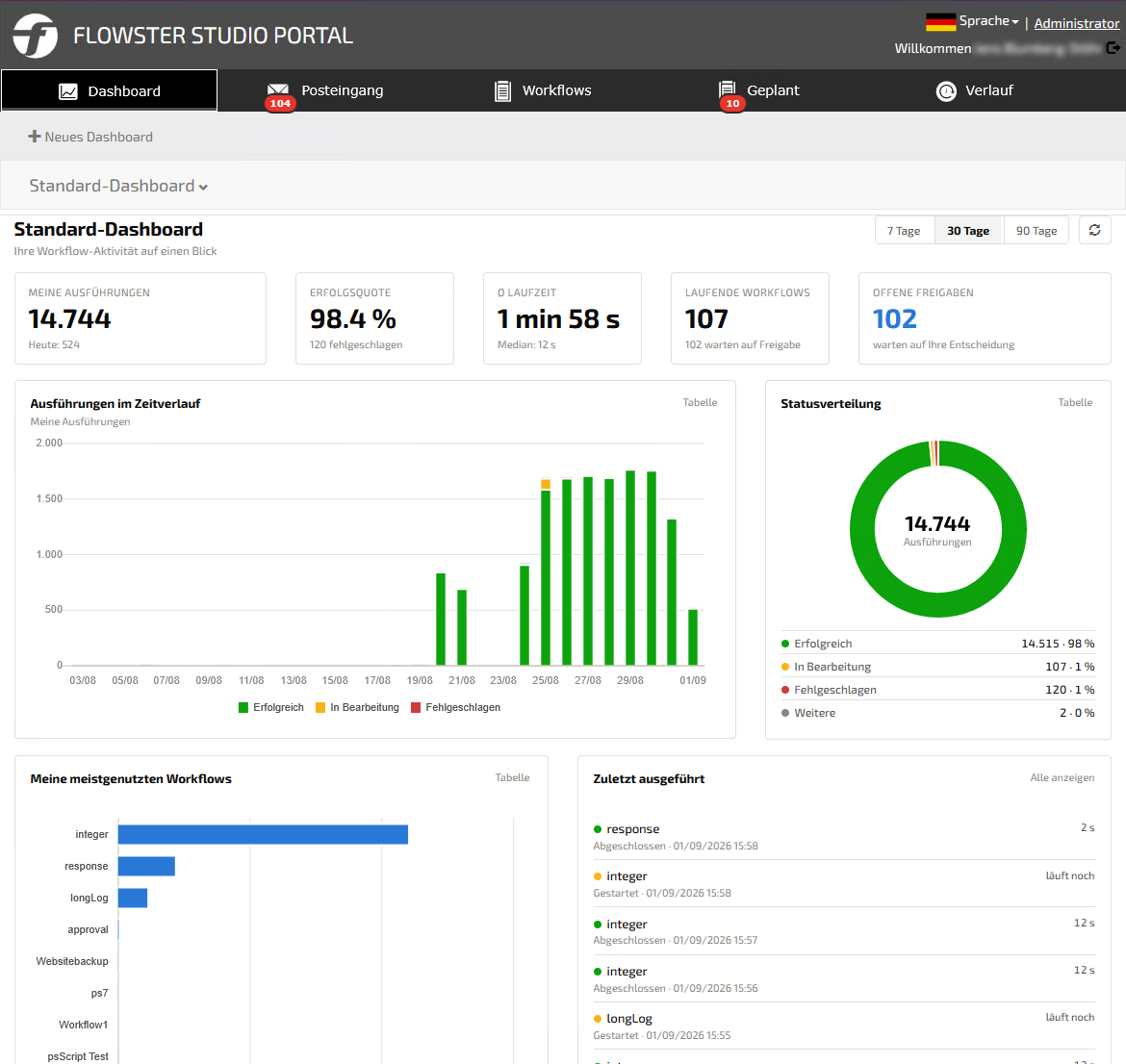
Personal dashboard
Your own executions, success rate, average runtime and pending approvals at a glance – plus your most used and most recently executed workflows.
Interactive inbox
All items awaiting your action in one central inbox: grant approvals with a click, pause running workflows or follow them via live tracking.
Structured workflow catalog
A service catalog with categories such as Teams or Production. Each form starts the process in the background with validation – for example user onboarding or VM creation.
History, export and personal scheduling
Personal and shared history show every workflow run – exportable to Excel, CSV or PDF. Under “Scheduled” you control one-off and recurring workflows yourself: activate, deactivate or run immediately.
2. Predictive maintenance with AI assessment
For administrators, passive error logs become an active early-warning system.
- Platform messages and failed workflow runs bundled in one place.
- AI incident analysis at the push of a button: “Assess now” delivers causes and remediation hints.
- Error groups with trend versus the previous period – recurring causes become visible immediately.
Error handling: focus on the affected step
Workflow logging shows the process with the status of each step. In this example, the failed connection to Proxmox is highlighted; the details and corresponding error message appear on the right. This makes it possible to distinguish executed steps, failed steps, handled errors and steps that were not executed.
3. Audit-proof according to ISO 27001, BSI IT-Grundschutz and NIS2
With NIS2 and ISO 27001, a complete record of system changes becomes mandatory. The new change log makes it simple.
- Tamper-proof record of every change – including login sessions.
- Metrics on security-critical events, failed logins and acting users.
- “Verify integrity” and evidence export as CSV or JSON for auditors.
4. Platform statistics and workflow analytics
- “Not installed” check: shows workflows using missing activities – before they fail on their next run.
- Workflow tree with Statistics, Execution Logs and Scheduled Workflows tabs right at the selected workflow.
- Runtimes (average, median, min/max), success rates and trends per workflow and version.
- Central scheduling of all planned workflows with pause, instant start and edit.
Conclusion
FLOWSTER 5.6 makes automation simpler for users and more manageable for administrators – with more transparency, fewer incidents and reliable evidence for audits.